
Diigo has been one of the important names in digital research for a long time. Its combination of web highlighting, sticky notes, tags, shared groups, and saved pages helped define how many people built a personal research library online. Students, journalists, designers, and strategy teams used it to collect sources and leave useful context beside the pages they wanted to remember.
Overview
Diigo has been one of the important names in digital research for a long time. Its combination of web highlighting, sticky notes, tags, shared groups, and saved pages helped define how many people built a personal research library online. Students, journalists, designers, and strategy teams used it to collect sources and leave useful context beside the pages they wanted to remember.
That legacy deserves respect. Diigo helped move bookmarking beyond a browser folder and toward a more deliberate knowledge workflow. But the web has changed since those early years. A modern archive may contain a product page, an interface reference, a social post, a PDF, a newsletter, a color palette, a code example, or a complete page snapshot. A simple list of URLs is no longer enough for many people.
In 2026, the best Diigo alternatives are defined by more than annotation. People also want visual previews, fast retrieval, reliable exports, cross-device access, privacy controls, and a clear answer to a basic question: where does my archive live, and who controls it?
This guide compares the strongest options through that wider lens. Keep Mates is first because it is built for visual references and a local-first workflow. Raindrop.io follows for polished cloud organization. Linkwarden is a strong choice for open-source archiving and collaboration, while Readwise Reader is better suited to deep reading and structured highlights. Wallabag and GoodLinks are also included for more focused use cases.
What modern Diigo users need from an alternative
The right replacement depends on what you actually save. A researcher building a reading queue needs different tools from a designer collecting landing pages, and a small team preserving sources needs a different archive from a person who wants a private library on one laptop.
- Mixed-content saving: Modern browsing produces more than text. A useful tool should handle links, images, PDFs, products, posts, and visual references without flattening everything into the same plain row.
- Visual recall: People often remember the shape, color, or layout of a saved page before they remember its title. Thumbnails and boards can make a large archive easier to revisit.
- Local-first or self-hosted control: A private archive should not feel like a temporary loan from a service that can change direction. Local storage, self-hosting, and dependable exports all improve long-term control.
- Useful context: Tags are valuable, but a short note explaining why something matters can be even more useful six months later.
- Low-friction retrieval: Saving is only half the workflow. Search, filtering, collections, and recognizable previews determine whether the archive becomes a working library or a digital graveyard.
The central trade-off is simple: cloud tools usually make synchronization and collaboration easier, while local-first and self-hosted tools give the user more ownership. Neither model is automatically right for everyone. The best choice is the one that matches your risk tolerance and your daily habits.
The best Diigo alternatives at a glance
| Tool | Best for | Storage model | Standout strength | Ideal user |
|---|---|---|---|---|
| Keep Mates | Visual references and private mixed-content archives | Local-first browser storage | Visual boards, folders, and fast recall | Designers, creators, developers, and privacy-conscious researchers |
| Raindrop.io | General-purpose bookmark organization | Cloud-hosted | Nested collections and multiple views | People who need polished multi-device sync |
| Linkwarden | Link preservation and team research | Self-hosted or hosted | Web snapshots, collections, and collaboration | Teams, journalists, and technical users |
| Readwise Reader | Deep reading and highlights | Cloud-hosted | Articles, PDFs, newsletters, RSS, and annotations | Researchers and heavy readers |
| Wallabag | Open-source read-it-later workflows | Self-hosted or hosted | Clean text extraction and offline reading | Self-hosting enthusiasts and article-focused readers |
| GoodLinks | Lightweight Apple reading workflows | Local plus iCloud sync | Native simplicity and one-time purchase | Apple-only users who want less overhead |
1. Keep Mates — the visual, local-first choice
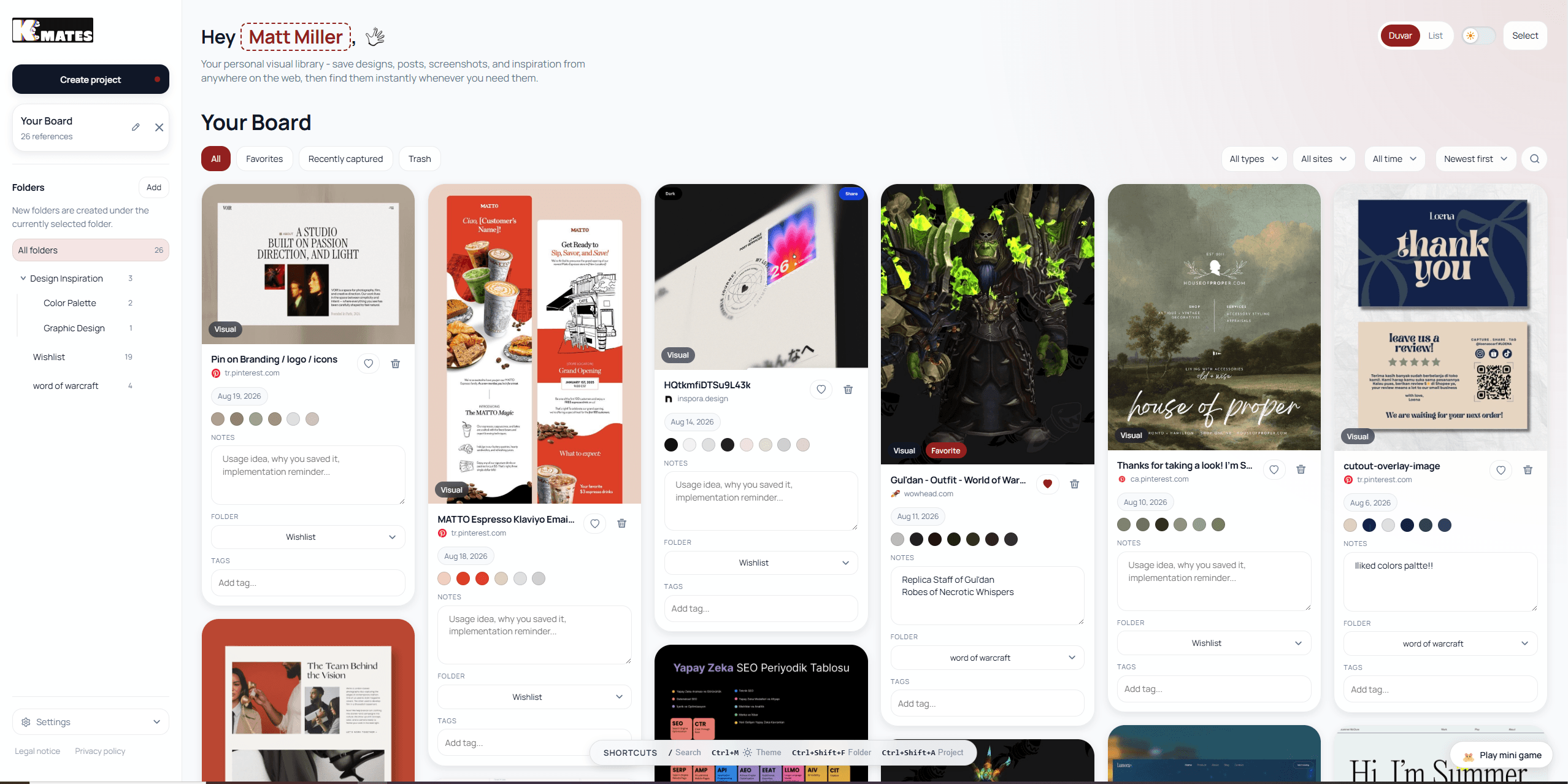
Keep Mates is the strongest Diigo alternative for people who save more than articles. It treats a saved reference as something you may need to recognize visually later, not only as a URL that must be found through a text query.
The extension is designed for saving websites, images, social posts, products, colors, fonts, and other references into an organized visual library. Folders and previews make it easier to separate a client project from personal inspiration, a research topic from a shopping list, or a useful UI pattern from an article you still need to read.
The most important difference is the local-first direction. When your saved library stays in the browser rather than being sent to a central archive server, the collection can feel faster and more private. It also changes the ownership conversation: your saved references are not dependent on a remote service remaining exactly the same forever.
Keep Mates is especially useful when the reason for saving is visual. A designer may remember a muted palette, a landing-page composition, or a typography treatment without remembering the page title. A marketer may want to keep a competitor example beside a note about its positioning. A developer may save an interface pattern and a code-related page in the same project folder. A visual archive keeps those situations natural instead of converting them into one long reading queue.
- Why choose Keep Mates: You want a visual library for mixed web content, not just a text list of articles.
- Privacy advantage: A local-first approach reduces dependence on a third-party cloud archive for the saved library.
- Organization: Folders, visual cards, notes, colors, and fonts support project-based retrieval.
- Best for: Designers, creators, developers, product teams, and researchers who revisit visual context.
- Trade-off: It is not intended to replace a full academic citation manager or a dedicated long-form reading app.
2. Raindrop.io — the polished cloud bookmark manager
Raindrop.io is a natural choice for people who want a mature cloud library with strong organization and access across devices. It extends the familiar bookmark model with collections, nested collections, tags, search, and several ways to view saved items.
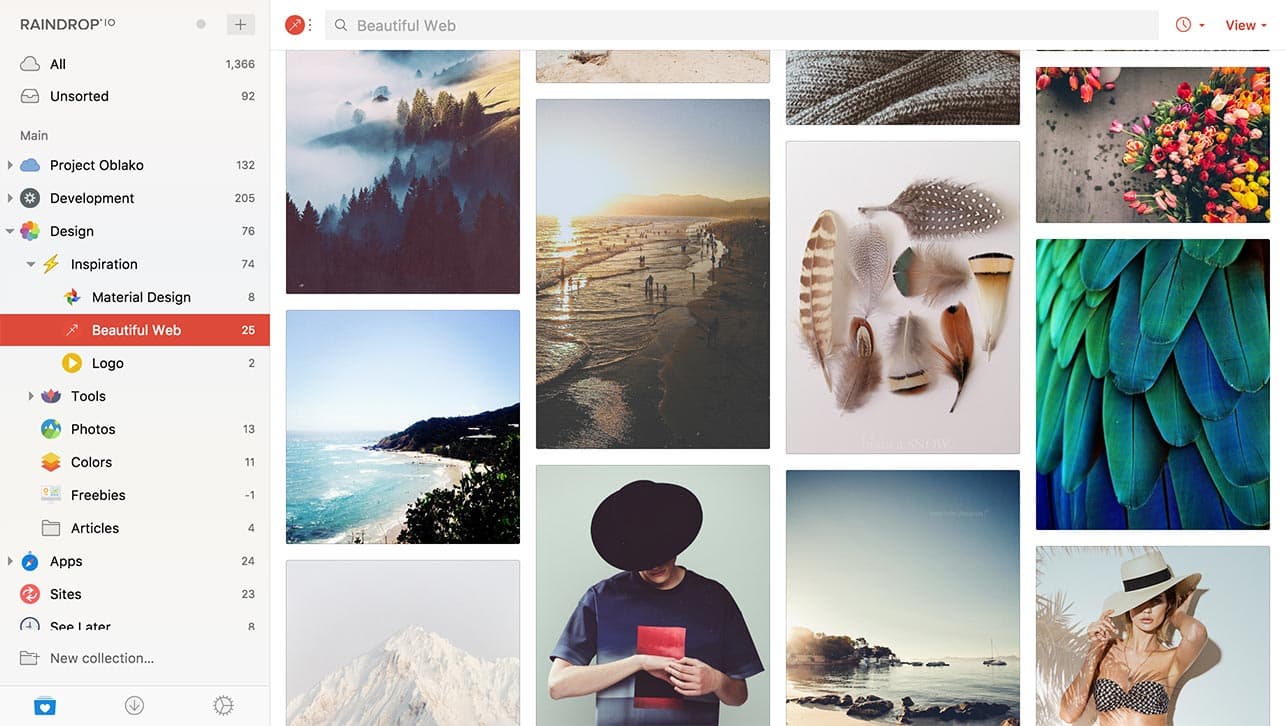
Its board, card, and list views make it more flexible than a traditional browser bookmark menu. A person can browse a visual collection for inspiration, switch to a compact list for research links, and use nested collections to keep projects separate. This flexibility is one reason Raindrop.io remains appealing to people who want a broad general-purpose archive without managing a server.
The main advantage is convenience. Cloud sync makes the same library available on a phone, tablet, and desktop, and the product is easy to recommend to families, freelancers, and teams that do not want to think about infrastructure. Raindrop.io also supports a more deliberate archive than a read-it-later queue because it gives collections and tags a central role.
The trade-off is the cloud model and the ongoing maintenance of a large taxonomy. If every saved link needs several tags and a perfect folder, the archive can become work in itself. It is best when you establish a small number of durable collections and use search for the rest.
- Why choose Raindrop.io: You want cloud sync, nested collections, and multiple visual layouts.
- Strengths: Mature interface, cross-device access, tags, collections, and visual browsing.
- Best for: General users, researchers, and teams who want a managed cloud service.
- Trade-off: Your archive depends on a hosted service and a consistent folder or tag habit.
3. Linkwarden — open-source archiving and collaboration
Linkwarden is a strong Diigo alternative when the important part of saving is preserving the source. It is closer to a research archive than to a lightweight reading queue. Collections, tags, and saved link cards give teams a shared place to keep useful sources, while snapshots help protect against link rot and changing pages.
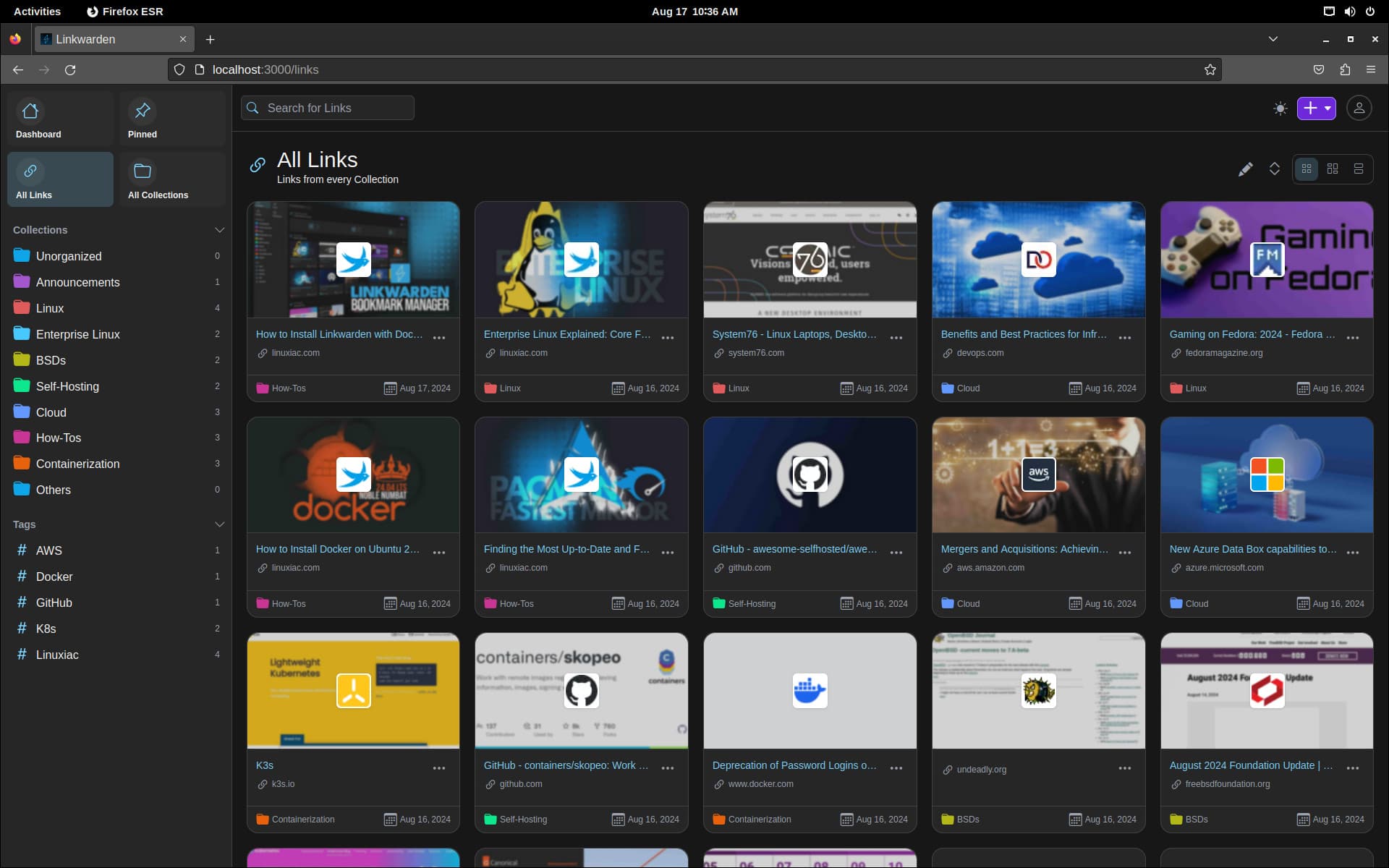
The self-hosted option is a major part of its appeal. Technical users can run the archive on infrastructure they control, while hosted options make the same idea more accessible to people who do not want to maintain a server. This makes Linkwarden useful for journalists, documentation teams, open-source communities, and anyone who needs a durable source library.
Collaboration is another differentiator. A group can create collections for a project, label sources consistently, and keep the link context visible to other members. That is more useful than passing around browser-bookmark files or asking everyone to maintain a separate private list.
Linkwarden is not the lightest tool for a person who only wants to save a quick image or article. The value appears when preservation, shared access, and structured collections matter enough to justify a little more setup.
- Why choose Linkwarden: You need preserved web sources, shared collections, or self-hosting.
- Strengths: Open-source direction, snapshots, tags, collections, and team workflows.
- Best for: Research teams, journalists, technical users, and self-hosting enthusiasts.
- Trade-off: Setup and administration can be more involved than a hosted bookmark app.
4. Readwise Reader — deep reading, highlights, and notes
Readwise Reader is the best fit in this guide for people whose Diigo workflow was primarily about reading, highlighting, and turning sources into a knowledge system. It brings articles, newsletters, RSS feeds, PDFs, and other reading material into one environment and gives annotations a central place.
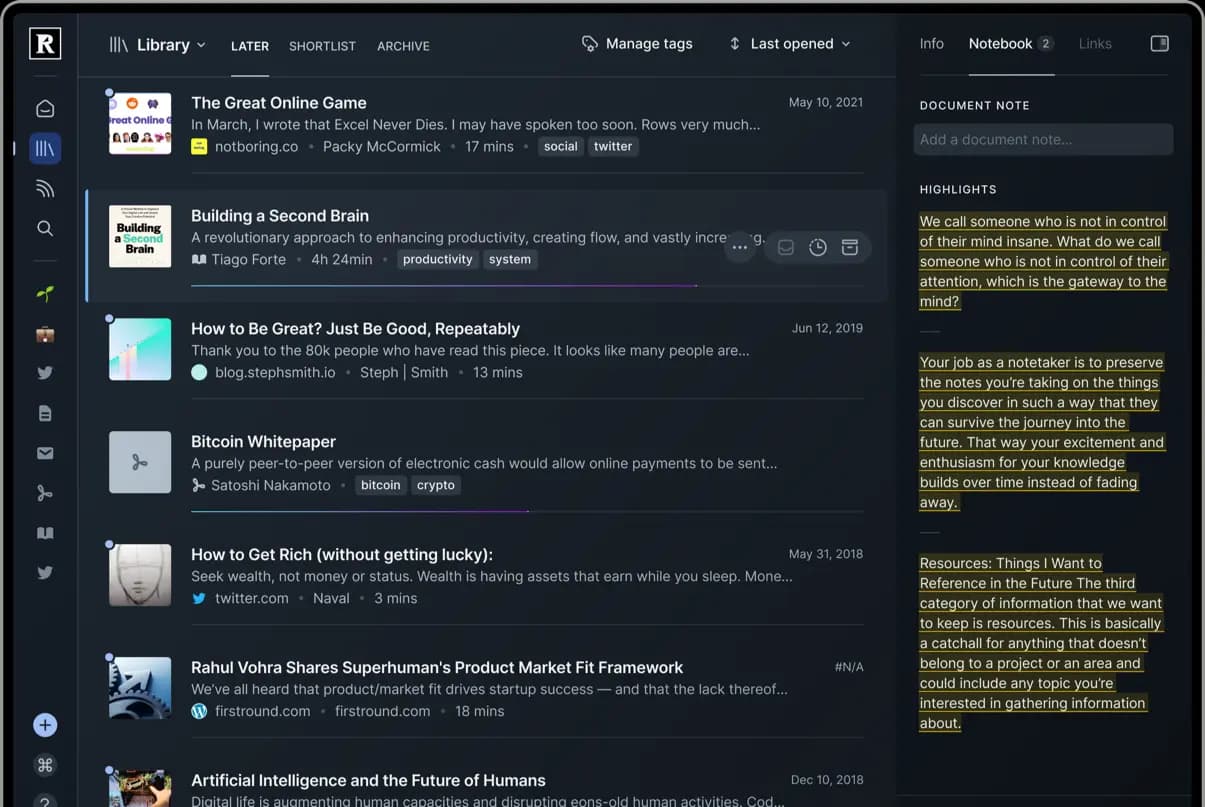
The product is less about building a visual inspiration wall and more about processing information. A saved article can move through a reading workflow, collect highlights, and connect to notes or a wider second-brain system. That makes it attractive to academics, writers, founders, and knowledge workers who want their reading to produce reusable ideas.
Readwise Reader is particularly strong when you save long-form material on purpose. It can be a better home than a general bookmark manager for newsletters, research articles, and documents that need focused attention. The downside is that a premium reading environment may be more than you need if most of your saves are visual references, product examples, or short links.
- Why choose Readwise Reader: You want reading, highlights, annotations, and knowledge capture in one workflow.
- Strengths: Multi-format reading, clean document views, highlights, tags, and note integrations.
- Best for: Researchers, academics, writers, and heavy readers.
- Trade-off: It is a subscription-oriented reading tool rather than a local visual archive.
5. Wallabag and GoodLinks for narrower workflows
Wallabag is one of the clearest choices for users who want an open-source, article-first read-it-later system. It cleans pages into a focused reading view, supports self-hosting, and can fit well into an offline or e-reader workflow. Choose it when the archive is mostly text and you care more about ownership than visual previews.
GoodLinks is a smaller, more focused option for Apple users. Its native feel, local storage direction, iCloud synchronization, and one-time purchase model appeal to people who want a simple reading list without a large cloud platform. It is a good fit for a personal Apple workflow, but less suitable for mixed team research or a visual reference library.
These tools show why there is no single Diigo replacement. The right product depends on whether your saved items are sources to preserve, articles to read, visuals to revisit, or links to share with a group.
Detailed comparison: which tool fits which workflow?
| Need | Best starting point | Why |
|---|---|---|
| Save design inspiration and mixed visual references | Keep Mates | Visual previews, folders, notes, and local-first direction |
| Browse a large archive on many devices | Raindrop.io | Cloud sync, collections, tags, and multiple layouts |
| Preserve sources and work with a team | Linkwarden | Shared collections, snapshots, and self-hosting options |
| Read deeply and build a highlight library | Readwise Reader | Articles, PDFs, newsletters, annotations, and integrations |
| Keep an open-source article queue | Wallabag | Clean reading view and self-hosted control |
| Use a light Apple-only reading list | GoodLinks | Native experience and low operational overhead |
The most useful test is to review the last twenty things you intentionally saved. If they are mostly articles, a reader-first tool may be best. If they include screenshots, product pages, social posts, colors, and design references, a visual archive will probably feel more natural. If several people need the same source library, collaboration and preservation should move higher on the list.
How to move a Diigo library to a new tool
Migration is easier when you treat it as a chance to clean up the archive rather than as a request to reproduce every old tag perfectly.
1. Export the original library: Use Diigo's library export options and keep the original HTML or CSV file untouched as a backup. 2. Import a representative sample: Start with a few hundred links from different years, tags, and content types. Check titles, notes, dates, and URLs before moving everything. 3. Separate active references from history: Create a folder for projects you still work on and another for older material. An archive is easier to use when it is not forced to behave like a task list. 4. Keep the taxonomy small: Use durable folders for projects or subjects and reserve tags for cross-cutting details. Too many one-off tags make retrieval slower. 5. Add context where it matters: A short note saying why a source was saved is often more valuable than adding another tag. 6. Test a second export: Before committing to a new platform, verify that you can export your library again in a standard format. Portability is part of privacy.
If your old Diigo library contains sensitive research, internal product ideas, or client references, compare the storage model before importing. A convenient cloud service can still be the right choice, but it should be a conscious choice rather than an invisible default.
Final verdict
Diigo's contribution to online research should not be reduced to an outdated bookmark system. It helped establish the idea that a saved web page can carry annotations, tags, and shared context. The next generation of tools builds on that idea in different directions.
Choose Keep Mates if you want a visual, local-first library for websites, images, posts, products, colors, and fonts. Choose Raindrop.io if cloud sync and flexible collections are your priority. Choose Linkwarden if source preservation, collaboration, and self-hosting matter most. Choose Readwise Reader if your archive is really a reading and highlighting system. Wallabag and GoodLinks remain strong when you want a narrower, more focused workflow.
The best Diigo alternative is therefore not the tool with the longest feature list. It is the one that keeps your saved material findable, keeps the reason for saving visible, and gives you an ownership model you can live with for years.
FAQ
What is the best Diigo alternative in 2026?
Short Answer
Keep Mates is a strong choice for visual bookmarking and local-first organization. Raindrop.io is better for a polished cloud archive, Linkwarden for preserved sources and collaboration, and Readwise Reader for deep reading and highlights.
Is Keep Mates a direct replacement for Diigo?
Short Answer
It is a strong replacement for the saving, organizing, and visual-reference parts of Diigo. It is not designed to be a full academic citation manager or a dedicated long-form reader for every research workflow.
Which Diigo alternative is best for privacy?
Short Answer
Local-first, self-hosted, and export-friendly tools give you more control than a fully hosted archive. Keep Mates, Linkwarden, and Wallabag each approach that control differently, so compare the exact data each product stores.
Which tool is best for designers?
Short Answer
Keep Mates is the most natural fit when the visual appearance of a page matters. Its archive is designed for images, interfaces, products, colors, fonts, and notes alongside the source link.
Should I choose a cloud app or a self-hosted tool?
Short Answer
Choose cloud hosting when effortless sync and low maintenance matter most. Choose self-hosting or local-first storage when ownership, privacy, and long-term control justify a little more responsibility.
Related Reading
Continue with the most relevant follow-up guides.
If you are still comparing tools after this article, the best next step is to keep the linking contextual instead of jumping into a generic card grid. These follow-up articles extend the exact decision you are making here.
If this article made you compare adjacent options, read Raindrop vs Pocket (2026): Which One Is Better?. Raindrop or Pocket? In 2026, we compare Raindrop with Pocket's former read-it-later workflow, including the pros and cons and a better way to manage your digital archive.
If this article made you compare adjacent options, read Eagle vs Keep Mates: I Used Both for Two Weeks, Here's the Difference. I ran Eagle and Keep Mates side by side for two weeks to see how they actually compare for saving and organizing visual references. Here's what changed my mind.
If this article made you compare adjacent options, read Keep Mates vs Eagle: Browser-Based Saving or Desktop Asset Manager?. Keep Mates and Eagle both help you collect visual references, but they run on different machines with different workflows. Compare pricing, platform, and organization style.
For broader research, browse the full blog archive for more comparisons, bookmarking guides, and read-it-later alternatives.
Ready to organize what you save?
Use the same research habit inside a cleaner archive.
Keep Mates helps you save pages, images, posts, colors, and fonts into folders so the references you collect stay usable after the tab is gone.
