
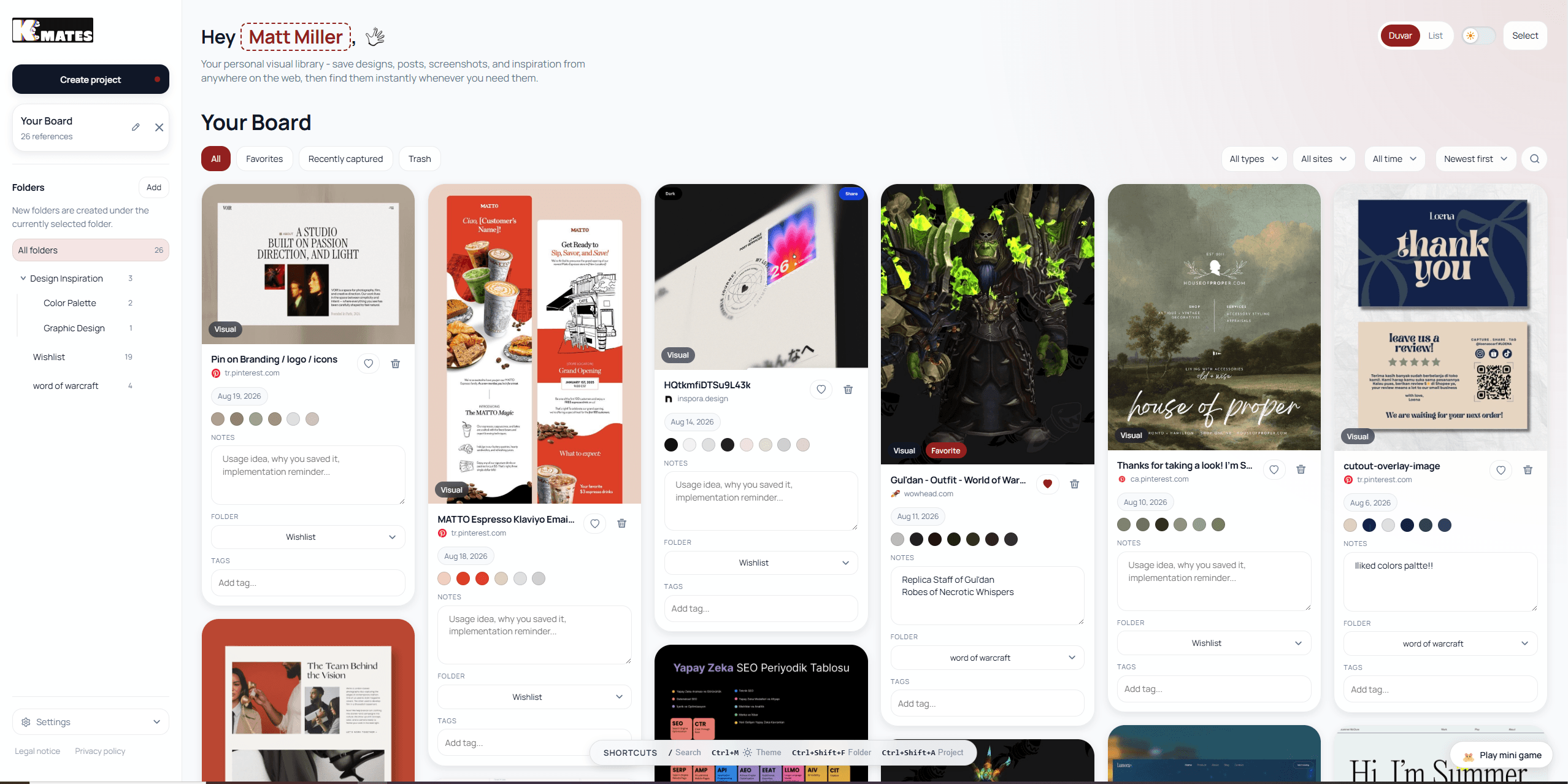
Designers don't bookmark the way everyone else does. A developer saves a documentation page. A researcher saves an article. A designer saves a color, a spacing rhythm, a hover animation, a packaging photo, a typeface pairing, a landing page they'll never visit again but need to remember forever. None of that fits neatly into a folder of blue underlined links.
Overview
Designers don't bookmark the way everyone else does. A developer saves a documentation page. A researcher saves an article. A designer saves a color, a spacing rhythm, a hover animation, a packaging photo, a typeface pairing, a landing page they'll never visit again but need to remember forever. None of that fits neatly into a folder of blue underlined links.
That mismatch is why "just use browser bookmarks" stops working for design work within about a month. It's also why an entire category of tools — visual bookmark managers — exists specifically to solve the problem browsers were never built for.
This guide is not a general "best bookmarking tools" roundup. It's written for one audience: designers who are actively collecting references, inspiration, and reusable design detail as part of their daily work, and who need a system that survives contact with a real project instead of turning into another junk drawer.
Why Designers Need a Different Kind of Bookmark Manager
Most bookmarking problems come down to one thing: the tool remembers the URL, not the reason you saved it.
For a designer, the reason is almost always visual. You saved that landing page because of the way the hero section used negative space. You saved that Dribbble shot because of a specific gradient. You saved that product photo because of the lighting. Six weeks later, a plain text bookmark titled "Home" tells you nothing. You have to click through and re-discover what you already found once.
A visual bookmark manager fixes this by treating the image, not the title, as the primary unit of memory. Instead of scanning a list of link titles, you scan a grid of what things actually looked like. That single shift — text-first to image-first — is the entire reason this category exists, and it's the first filter you should apply when evaluating any tool on this list.
But "visual" alone isn't enough for design work specifically. A genuinely designer-ready bookmark manager usually needs to go further than pretty thumbnails. It needs to help with:
- Design detail extraction. Colors, fonts, and CSS values from a live page, not just a screenshot of it.
- Mixed content types. A single archive that holds full pages, cropped screenshots, product images, and social posts side by side.
- Project-based grouping. Folders or boards that map to actual client work, not just a flat, ever-growing pile.
- Fast capture. One click, no tab-switching, no interrupting the browsing flow you're already in.
- A calm retrieval experience. Finding a reference from three months ago should take seconds, not an archaeological dig.
Keep that checklist in mind. Every tool below gets measured against it, not against a generic "is this a nice bookmarking app" standard.
How This List Was Built
Rather than ranking tools by popularity or marketing spend, this comparison groups them by what they're actually good at, because "best" depends entirely on what kind of designer you are and what stage of a project you're in. A freelance brand designer collecting moodboard material has different needs than a product designer archiving UI patterns for a design system, and both are different from an agency team that needs to hand off references to a client.
Each tool below is evaluated on:
1. How visual the saving and browsing experience actually is 2. Whether it captures design-specific detail (color, type, CSS) or only images 3. How well it supports organizing by project versus one giant pile 4. Pricing and how it scales as your archive grows 5. Where it falls short, honestly, because every tool on this list has a weak spot
The Best Visual Bookmark Managers for Designers
1. Keep Mates
Keep Mates is built specifically around the idea that a design reference isn't just an image — it's an image plus the design decisions behind it. When you save a page, you're not only capturing a screenshot. You can also pull the color palette straight off the page, grab the fonts in use, and keep the underlying CSS detail attached to the same saved item. That means the archive remembers not just what looked good, but what specifically created that effect, which is the part most visual bookmarking tools quietly drop.
Everything is organized into folders, so a project like a client rebrand can hold its own contained collection of pages, screenshots, colors, and product shots instead of getting mixed into a single undifferentiated feed. That project-based structure is what makes Keep Mates feel less like a scrapbook and more like a working reference library you can hand off, revisit, or search through months later and still understand.
The other detail worth knowing if you care about privacy or client confidentiality: Keep Mates is local-first. Saved references live on your own machine rather than being uploaded to a server by default, which matters if you're collecting competitor material, unreleased client work, or anything you'd rather not sync to someone else's cloud.
Best for: designers and developers who want design references and the underlying design detail (colors, fonts, CSS) captured together, organized by project, without everything routing through a third-party server.
Where it's still growing: as a newer product, its template and integration ecosystem is smaller than long-established players like Raindrop.io — you won't find the same depth of third-party plugins yet.
Pricing: free Starter tier (35 saves, 5 folders); Pro at roughly $9/month for expanded capacity and multi-device support.
2. Eagle
Eagle is one of the most established names in this category for a reason — it was built by and for people who manage large libraries of visual assets, and it shows. Rather than being a browser extension bolted onto a bookmarking workflow, Eagle is a full desktop application designed to hold thousands of images, screenshots, and design files in a single searchable library.
Its tagging and smart-folder system is genuinely powerful. You can build rules that automatically sort incoming saves by color, file type, or tag, which becomes valuable once your library grows past a few hundred items and manual filing stops being realistic. Eagle also handles a wider range of file types than most competitors — you can drop in PSDs, AI files, and video clips alongside web screenshots, which makes it closer to a full digital asset manager than a lightweight bookmarking tool.
The trade-off is friction. Eagle is a heavier, more deliberate tool. Saving something usually means opening the app, not a one-click browser action, and the learning curve for its more advanced organizational features is steeper than anything else on this list. It's also a one-time purchase per license rather than a simple subscription, which some designers prefer and others find awkward to budget for.
Best for: designers with large, mixed-format visual libraries — not just web references but local design files — who want serious desktop-grade organization and don't mind a steeper setup.
Where it falls short: less convenient for fast, in-the-moment web capture compared to a lightweight browser extension; the desktop-first model means it's not as frictionless for casual daily saving.
3. Raindrop.io
Raindrop.io is the safest general-purpose choice on this list, and for a lot of designers, "safe" is exactly what they want. It supports a genuinely useful visual grid view alongside a more traditional list view, so you can toggle between scanning by image and scanning by text depending on what you're looking for. Nested collections let you build a folder hierarchy that can mirror actual client or project structure, and its tagging system is flexible enough to layer additional organization on top.
What sets Raindrop.io apart from more design-specific tools is its maturity. It has browser extensions for every major browser, mobile apps, a well-documented API, and a large enough user base that troubleshooting and integrations are easy to find. If you want a tool that will still be actively maintained and broadly compatible in five years, Raindrop.io's track record is hard to bet against.
It isn't a design-specific tool, though, and that shows in exactly the places you'd expect. There's no built-in color or font extraction, no CSS capture, and no design-detail layer beyond the visual thumbnail itself. For a developer saving documentation or a researcher saving articles, that's a non-issue. For a designer who wants the archive to remember the exact hex codes and typefaces behind a reference, Raindrop.io stops short.
Best for: designers who want a reliable, broadly compatible visual bookmark manager and are comfortable pairing it with a separate tool (like a color picker extension) for design-detail extraction.
Pricing: generous free tier with no save limit; Pro adds full-text search and permanent backups for a low monthly cost.
4. MyMind
MyMind takes a fundamentally different approach from folder-based tools, and it's worth understanding before you commit to it. There are no folders and no manual tagging system at all. Instead, everything you save gets automatically categorized by AI — by subject, by color, by content type — and retrieval happens through search and filtering rather than browsing a structure you built yourself.
For the right kind of designer, this is close to magic. If you tend to save fast and organize never, MyMind removes the filing step entirely and still lets you find things later by describing what you remember about them. The visual card layout is also one of the most polished in the category — saves genuinely look like a curated moodboard rather than a utility app.
The trade-off is control. If you're the kind of designer who thinks in explicit project folders — one for each client, one for each active brief — MyMind's structureless model can feel disorienting rather than freeing. There's also no design-detail extraction; it's an image-and-content memory tool, not a color-and-font capture tool. And it's a paid-first product with a limited free tier, which matters if you're evaluating this as a student or freelancer on a tight budget.
Best for: designers who save constantly, don't want to manage folders, and are comfortable trusting AI categorization to make things findable later.
Where it falls short: no explicit project structure, no design-detail extraction, and a smaller free tier than most alternatives on this list.
5. Milanote
Milanote solves a problem none of the archive-style tools above really touch: the moment when you stop collecting references and start arranging them into something presentable. Instead of storing saves in a folder or a scrolling feed, Milanote gives you an open, freeform canvas where you can place images, notes, and links anywhere you want and physically arrange them in relation to each other.
That spatial freedom is genuinely useful for the parts of design work that are about relationships between references, not just the references themselves — building a moodboard where color, type, and imagery need to sit next to each other to make a point, or walking a client through an early concept direction as a visual narrative rather than a list.
Where Milanote struggles is as a daily capture tool. It's built for composing a board you already have a point of view on, not for dumping everything you stumble across during a normal day of browsing. If your problem is that references vanish before you get a chance to use them, Milanote won't fix that on its own — it's a downstream tool, best used after a capture tool like Keep Mates or Raindrop.io has already done the collecting.
Best for: designers who need to arrange references spatially for moodboards, brand exploration, or client presentations — as a second tool alongside a proper capture-and-archive system, not a replacement for one.
6. Pinterest
Pinterest is the tool most designers already have open in another tab, and dismissing it entirely from this list would be dishonest. Its board system is intuitive, its visual discovery algorithm is genuinely strong for finding new inspiration you weren't specifically searching for, and the sheer scale of its content library means almost any aesthetic direction has something to browse.
But Pinterest was built as a public discovery network first and a personal archive second, and that shows the moment you try to use it as your primary reference system. There's no meaningful way to preserve why you saved something beyond a board name. It's not designed to hold mixed content — a saved product page, a client's competitor site, and a color palette don't coexist naturally the way they do in a purpose-built archive tool. And because it's public-facing by default, it's a poor fit for confidential client work unless you're careful with private boards.
The realistic way most designers end up using Pinterest in 2026 is as a discovery layer, not an archive: browse and pin broadly on Pinterest, then pull the specific references that matter into a dedicated, private, project-organized tool for actual use.
Best for: broad visual discovery and moodboarding in the early, exploratory stage of a project — not as a substitute for a private, structured reference archive.
7. PureRef
PureRef occupies a slightly different niche than everything else on this list: it's a lightweight, standalone reference board application rather than a browser-based bookmark manager. You drag images directly onto an infinite canvas, resize and arrange them freely, and the whole board floats as a reference window you can keep open alongside your actual design software.
Its strength is simplicity and speed once images are already on your machine — there's essentially no learning curve, and because the board sits outside your browser, it's genuinely useful as a live reference sheet you glance at while working in Figma, Photoshop, or Illustrator. Many concept artists and illustrators use it for exactly this reason.
Its weakness is capture. PureRef doesn't have a browser extension for one-click saving from the web, no cloud sync, no tagging, and no search beyond visually scanning the board. It's a composition and working-reference tool, not a searchable archive — closer to Milanote in purpose than to Keep Mates or Raindrop.io, but with far less structure and no web-saving convenience at all.
Best for: designers who want a free, always-on-top reference board to glance at while working, and who don't mind manually dragging images in.
8. Bookmarkify
Bookmarkify positions itself directly at creative professionals, and its feature set reflects that. Saving replaces the usual link with a visual preview, it supports tag- and filter-based organization across multiple view modes, and it includes an AI-assisted design analysis feature aimed at pulling fonts and color palettes from saved sites — a similar idea to what design-focused tools increasingly try to offer.
Where it differentiates itself further is collaboration. Bookmarkify includes shared workspace functionality aimed at agencies and design teams who need to build and maintain reference libraries together, with commenting and tagging happening inside a shared space rather than a personal one. For a small studio that currently shares references through a messy Slack channel, that's a meaningful upgrade.
As a newer, more actively marketed product, it's worth going in with the same expectation you'd have for any young SaaS tool: feature velocity is high, but the ecosystem — integrations, longevity, community troubleshooting — is still being built.
Best for: small design teams or agencies that need shared, collaborative reference libraries rather than a single-user archive.
9. CSS Peeper
CSS Peeper isn't a bookmark manager in the traditional sense — it's a browser extension focused entirely on inspecting and extracting design detail from a live page: color palettes, font stacks, image assets, and basic CSS values, all without opening developer tools. For designers who need to reverse-engineer why a page works, it's one of the fastest ways to get that answer.
Its limitation is scope. CSS Peeper doesn't save anything for later, doesn't organize references into folders, and isn't meant to function as an archive at all. It's an inspection tool you reach for in the moment, not a system for building a long-term visual library. Most designers who use it pair it with a separate archive tool for the actual saving and organizing.
Best for: quick, in-the-moment extraction of colors, fonts, and CSS from a page you're looking at right now — not for long-term archiving.
10. Design Sidekick and Peek
Two smaller, more specialized tools round out this list, and both are worth a mention if the tools above don't quite fit your workflow. Design Sidekick focuses on lightweight design inspection and reference-saving aimed at a narrower, more casual use case than a full archive system. Peek takes a similarly minimal approach, prioritizing quick capture and simple browsing over deep organization or design-detail extraction.
Neither is trying to be a full replacement for a structured, project-based archive. Both are better understood as fast, low-friction utilities — useful if your reference-saving needs are occasional rather than constant, but likely to feel thin once you're managing multiple active client projects at once.
Best for: designers with light, occasional reference-saving needs who don't want the overhead of a full archive system.
Quick Comparison: What Each Tool Is Actually Best At
| Tool | Design-detail capture (color/font/CSS) | Project/folder structure | Collaboration | Best moment to use it |
|---|---|---|---|---|
| Keep Mates | Yes | Yes, local-first | Limited | Ongoing project archiving |
| Eagle | Partial (via tagging, not live extraction) | Yes, advanced | Limited | Large mixed-format libraries |
| Raindrop.io | No | Yes | Limited | General-purpose visual bookmarking |
| MyMind | No | No (AI-organized) | No | Fast, structureless saving |
| Milanote | No | Canvas-based | Yes | Arranging and presenting moodboards |
| No | Boards | Public/shared | Early-stage discovery | |
| PureRef | No | Canvas-based | No | Live working reference sheet |
| Bookmarkify | Partial (AI-assisted) | Yes | Yes | Team reference libraries |
| CSS Peeper | Yes (inspection only) | No | No | On-the-spot design inspection |
Matching the Tool to Your Actual Workflow
Rather than picking a single "winner," it's more useful to map these tools to the moment in a design process where you'd actually reach for them.
If you're in the early discovery phase, casting a wide net for inspiration without a specific project in mind yet, Pinterest is still the strongest option for volume and serendipity. You're not trying to build a structured archive at this stage — you're trying to see as much as possible.
If you've started an active project and need to save references you'll reuse, a structured, project-based archive matters more than discovery breadth. This is where Keep Mates, Eagle, and Raindrop.io compete directly, and the deciding factor usually comes down to whether you need design-detail extraction (Keep Mates), large mixed-format asset management (Eagle), or the broadest general-purpose reliability (Raindrop.io).
If you save constantly and organizing feels like a chore, MyMind's AI-first approach removes the filing step entirely, at the cost of explicit project structure.
If you need to turn saved references into something presentable — a client deck, a brand exploration board, a concept pitch — Milanote or PureRef become the right tool, but only after a capture tool has already done the collecting.
If you're working with a team and references need to be shared, commented on, and jointly maintained, Bookmarkify's collaborative workspace model addresses a gap that most single-user tools leave open.
Archive First, Moodboard Second: A Mistake Worth Avoiding
One pattern shows up constantly among designers who are frustrated with their current bookmarking setup: they're trying to make a single tool do both jobs — permanent archive and active moodboard — and it's quietly failing at both.
An archive's job is retrieval. It needs to be fast to save into, reliable to search, and structured enough that something you saved eight months ago is still findable. A moodboard's job is composition. It needs spatial freedom, the ability to arrange and compare, and a presentation-ready look when you're done.
Tools that try to do both usually compromise on one side. A folder-based archive like Keep Mates or Raindrop.io will never feel as freeform as a canvas tool, because structure and freeform arrangement are somewhat opposed goals. A canvas tool like Milanote or PureRef will never feel as fast for daily bulk-saving as a purpose-built archive, because arranging by hand takes longer than filing into a folder.
The workflow that tends to hold up over a full year of real project work, rather than just the first enthusiastic week, is a two-tool system: a fast, structured archive for continuous saving, and a separate canvas tool you pull specific references into only when you're ready to compose something. Trying to collapse that into one tool is usually where "I have a great bookmarking system" turns into "I have 400 unsorted saves and no idea what half of them are" within a couple of months.
Pricing Considerations for Freelancers vs. Agencies
Budget shapes this decision more than most comparison articles admit, so it's worth being direct about it.
If you're a freelancer or solo designer, a generous free tier matters more than a slightly better feature set on a paid plan you'll resent every month. Raindrop.io's uncapped free tier and Keep Mates' free Starter tier are both reasonable starting points before you know whether you'll actually use the tool long-term. Avoid committing to a per-seat team plan or a heavy one-time desktop license until your save volume actually justifies it.
If you're part of a small studio or agency, shared access becomes the deciding factor much faster than any individual feature. This is where Bookmarkify's collaborative workspace or Eagle's library-sharing capabilities start to matter more than they would for a solo user, even if the per-seat cost is higher.
If your work involves confidential client material — unreleased branding, competitor research, pre-launch products — a local-first tool that doesn't route your saves through a third-party server by default (Keep Mates falls into this category) is worth prioritizing over a tool that's marginally more feature-rich but stores everything in the cloud.
Common Mistakes Designers Make When Choosing a Bookmark Manager
A lot of the frustration designers feel with bookmarking tools isn't actually a tool problem — it's a setup problem. A few patterns show up repeatedly.
Picking based on the prettiest interface instead of the actual save flow. It's easy to be won over by a beautiful landing page and a slick demo video, then discover three weeks later that saving something in the middle of a busy browsing session takes four clicks instead of one. The interface you'll interact with a hundred times a week is the extension popup or keyboard shortcut, not the marketing site. Test the actual capture flow before committing, not just the gallery view.
Starting with too much structure. Some designers, especially ones coming from a messy browser-bookmarks situation, overcorrect by building an elaborate folder hierarchy on day one — a folder for every possible sub-category before they've saved a single item. That structure almost never survives contact with real usage. It's more durable to start with a handful of broad folders (by client, or by active project) and let subfolders emerge only once a category actually has enough saves to justify splitting it.
Ignoring what happens to saves after the project ends. A folder-per-project system works beautifully while the project is active and falls apart the moment you have forty completed-project folders you never open again but don't want to delete either. Whatever tool you choose, decide early whether you'll archive, merge, or delete completed-project folders — and actually do it, rather than letting the tool silently become a graveyard.
Assuming one tool has to do everything. As covered above, archive tools and moodboard tools solve different problems, and expecting a single app to be a fast daily-capture system and a polished client-presentation canvas usually means it does neither job particularly well. It's fine, and often better, to run two lightweight tools instead of one tool trying to stretch across both jobs.
Not checking what happens to your data if you cancel. This matters more than it seems like it should. Some tools export cleanly to a portable format if you switch later; others make it deliberately painful to leave. Before you invest months of saves into any tool on this list, check whether there's a straightforward export option. A locked-in archive isn't really an archive — it's a rental.
How to Migrate From Browser Bookmarks Without Losing Anything
If you're currently relying on Chrome or Firefox's built-in bookmarks bar and finally ready to move to a proper visual system, the migration is usually less painful than it looks, as long as you approach it in the right order.
Start by exporting, not deleting. Every major browser can export your existing bookmarks as an HTML file from its bookmark manager settings. Do this first, before you touch anything else, so you have a backup regardless of what happens next.
Import in bulk, then re-sort gradually. Most visual bookmark managers, including Raindrop.io and several others on this list, support importing that HTML export directly, which will bring everything in as a flat, unsorted batch. Resist the urge to perfectly re-organize all of it in one sitting — that's the kind of task that makes people abandon migrations halfway through. Instead, import everything into a single "Unsorted" or "Imported" folder, then re-file items into proper project folders only as you actually revisit them. Stale references you never open again can simply stay in that catch-all folder indefinitely without costing you anything.
Rebuild your capture habit before you rebuild your archive. The bigger win from switching tools usually isn't the one-time migration — it's changing the muscle memory of how you save things going forward. Install the new tool's browser extension, pin it somewhere visible, and make a deliberate effort to use it for the next two weeks for every save, even the ones you'd normally just leave open in a tab. The old browser-bookmarks habit fades fast once the new capture flow becomes the path of least resistance.
Don't migrate design-detail extraction retroactively. If you're moving to a tool like Keep Mates specifically for its color and font capture, understand that this only applies going forward — a bulk-imported old bookmark won't magically gain a captured color palette. That's fine. Treat the migration as a clean archive of old references and let the new capture features apply to everything you save from this point on.
What Six Months of Consistent Use Actually Looks Like
Most comparison articles stop at the point of purchase — which tool to pick — and skip the part that actually determines whether the decision was right: what your archive looks like after real, sustained use. It's worth walking through, because the failure modes only show up over time.
At around the one-month mark, almost every tool on this list feels great. You've imported your old bookmarks, you're saving consistently, and the novelty of a visual grid instead of a text list feels like a genuine upgrade. This is also the point where most comparison decisions get made and reviews get written, which is part of why so much bookmarking-tool content undersells how the experience changes later.
By month three, the real test begins. Your save count has grown past the point where you can eyeball the whole archive at once. This is where folder structure, search quality, and tagging discipline start to matter more than visual polish. A tool with weak search or shallow filtering starts to feel noticeably worse here, even if nothing about the tool itself has changed — the problem is that your archive has outgrown a flat or loosely organized structure. This is also the point where design-detail extraction, if the tool offers it, starts paying off: you stop needing to revisit the original page to remember a color or font, because it's already sitting next to the saved reference.
By month six, the tools that survive are the ones where retrieval still feels fast. If you can think of a reference you saved months ago and find it again in under thirty seconds, the system is working. If finding anything older than a few weeks means scrolling through hundreds of unsorted thumbnails or re-searching the web because it's faster than digging through your own archive, the tool — or more often, your usage of it — has quietly failed, even if it looked perfect on day one.
The practical takeaway: when evaluating any tool on this list, weight search quality, folder scalability, and retrieval speed more heavily than first-impression visual polish. The grid view sells the tool. The search bar is what determines whether you're still using it honestly a year later.
Browser Performance and Extension Overhead
One practical factor rarely gets mentioned in bookmarking comparisons: what the tool does to your actual browsing experience while it's running. Designers tend to run browsers with an unusually heavy extension load already — color pickers, dev tools, grid overlays, accessibility checkers — and adding a bookmarking extension on top of that isn't free.
Browser-extension-based tools (Keep Mates, Raindrop.io, Bookmarkify) generally add minimal overhead since capture happens on demand rather than running continuous background processes. Desktop-app tools (Eagle) live outside the browser entirely, which avoids extension bloat but means switching context to a separate application every time you want to save or browse. Canvas tools (Milanote, PureRef) sit somewhere in between depending on whether you're using the web version or a native app.
If you're already running a heavy extension stack, it's worth briefly checking a new tool's resource usage in your browser's task manager during a normal work session before committing to it long-term, especially if you've previously had a browser slow down from extension creep.
Frequently Asked Questions
What makes a bookmark manager actually good for designers, specifically?
A designer-focused bookmark manager needs to go beyond generic link-saving. The core requirements are a visual, image-first browsing experience; support for mixed content types like screenshots, product images, and full pages together; and ideally the ability to extract design detail — colors, fonts, and CSS — rather than just a picture of the page.
Can visual bookmark managers save colors and fonts, not just images?
Some can. Keep Mates and Bookmarkify both include some form of design-detail extraction alongside standard visual saving, while general-purpose tools like Raindrop.io and Pinterest focus purely on the visual preview without pulling underlying design values.
Should I use Pinterest as my main design reference archive?
Pinterest works well for broad discovery and early-stage moodboarding, but it isn't built as a private, structured personal archive. Most designers get better long-term results using Pinterest for discovery and a dedicated tool for actually archiving and organizing project-specific references.
What's the difference between a bookmark manager and a moodboard tool for designers?
A bookmark manager is optimized for saving and retrieving references over time — speed, search, and structure matter most. A moodboard tool like Milanote or PureRef is optimized for arranging and presenting references spatially once you already know what you want to say with them. Most solid workflows use one of each rather than expecting a single tool to do both well.
Is a local-first bookmark manager worth prioritizing for client design work?
If you regularly save confidential material — unreleased branding, competitor research, or client work under NDA — a local-first tool that keeps your saved library on your own device rather than a third-party server reduces one category of risk that cloud-first tools don't address.
Do I need a paid plan, or is a free bookmark manager enough for design work?
For light or early-stage use, free tiers from tools like Raindrop.io or Keep Mates are usually enough to evaluate whether a tool fits your workflow. Paid plans generally start to matter once you're saving in high volume, need more than a couple of devices, or require team collaboration features.
Can I use more than one visual bookmark manager at the same time?
Yes, and for many designers this ends up being the most realistic setup rather than a compromise. A common combination is a fast, structured archive tool for daily capture (Keep Mates or Raindrop.io) paired with a separate canvas tool (Milanote or PureRef) used only when it's time to compose a moodboard or client presentation from references you've already collected. Running two focused tools usually works better than forcing one tool to cover both jobs.
How do I stop my design reference archive from becoming as messy as my old bookmarks bar?
The two habits that matter most are filing as you go rather than in bulk later, and periodically archiving or clearing out folders tied to completed projects instead of letting them accumulate indefinitely. A tool with fast, low-friction capture makes the first habit realistic; the second one is entirely on you regardless of which tool you pick.
Is it worth paying for a bookmark manager if I'm still a design student?
Probably not yet. Most of the tools on this list have free tiers generous enough to cover a student's save volume, and the habit of organizing references consistently matters more at this stage than any premium feature. It's more useful to build the capture habit for free first and upgrade later once you can point to a specific limitation — running out of storage, needing more devices, or needing collaboration — that a paid plan would actually solve.
Choosing Yours
There's no single best visual bookmark manager for every designer, because "best" depends on where you actually lose references today. If the problem is that inspiration disappears before you get a chance to use it, prioritize fast, low-friction capture over deep organization. If the problem is that your saves are unusable months later because you can't remember the color or font behind them, prioritize a tool that extracts that detail at save time instead of leaving you to reconstruct it from memory. And if the real problem is that you're trying to force one tool to be both your archive and your presentation layer, the fix usually isn't a better tool — it's accepting that those are two different jobs and picking one tool for each.
Start by being honest about which stage of the workflow is actually broken for you right now, and let that — not a feature list — decide which tool on this list is worth installing first.
A reasonable way to close the loop, if you're still undecided: install the free tier of whichever tool matches your current biggest pain point, use it exclusively for two weeks on one active project, and pay attention to whether you're still reaching for it by the end of week two without having to remind yourself to. That two-week test tells you more than any comparison article, including this one, ever could — because it's the only test that reflects how the tool fits into your actual work rather than how it looks in a demo.
Related Reading
Continue with the most relevant follow-up guides.
If you are still comparing tools after this article, the best next step is to keep the linking contextual instead of jumping into a generic card grid. These follow-up articles extend the exact decision you are making here.
If this article made you compare adjacent options, read Visual Bookmark Manager Guide for Designers and Developers. End tab clutter. Discover privacy-first, local-first, visual bookmarking methods for your creative and technical projects.
If this article made you compare adjacent options, read Why Your Browsing History Should Not Go to a Server. Learn why local-first save tools protect privacy better than cloud-first apps, and why your browsing history should stay on your own device.
If this article made you compare adjacent options, read Why We Built Keep Mates: A Visual Bookmarking Tool for People Who Actually Collect Things. Keep Mates started as a fix for a messy bookmarks bar. Here's the story behind the visual bookmark manager - and what it actually does.
For broader research, browse the full blog archive for more comparisons, bookmarking guides, and read-it-later alternatives.
Ready to organize what you save?
Use the same research habit inside a cleaner archive.
Keep Mates helps you save pages, images, posts, colors, and fonts into folders so the references you collect stay usable after the tab is gone.
