
If you spend your day moving between design work, content, and web development, you already know the routine. You're scrolling Dribbble, Pinterest, Behance, Savee - and something catches your eye. A color combination. A layout. A typeface pairing that just works. You save it, tell yourself you'll come back to it, and move on.
Overview
If you spend your day moving between design work, content, and web development, you already know the routine. You're scrolling Dribbble, Pinterest, Behance, Savee - and something catches your eye. A color combination. A layout. A typeface pairing that just works. You save it, tell yourself you'll come back to it, and move on.
The problem is where you save it. A browser bookmarks bar was never built for this. It was built to remember addresses, not ideas. So three weeks later you've got a folder of blue links with no thumbnails, no context, and no way to tell which one was "that gradient site" versus "that other gradient site." That's the exact wall we kept hitting at Welyeo - juggling client design work, web builds, and marketing at the same time - and it's the reason Keep Mates exists.
The Problem: Bookmarks Were Never Built for Visual Work
We weren't trying to build "yet another bookmarking app." We were trying to fix a specific, repetitive annoyance: spending more time hunting for a reference we knew we'd saved than we spent actually using it.
A plain link doesn't tell you anything. You have to click through, wait for the page to load, and hope it hasn't changed or disappeared. For anyone doing visual work - design, marketing, front-end development - that's dead time, every single day. What we needed wasn't a bookmark manager. It was a visual bookmarking tool: something that saved what made the page worth keeping in the first place, not just where it lived.
That's the whole idea behind a visual bookmark manager - instead of a list of titles you have to click through to remember, you get a library you can recognize at a glance, the way you'd flip through a photo album instead of a spreadsheet.
What Keep Mates Actually Does
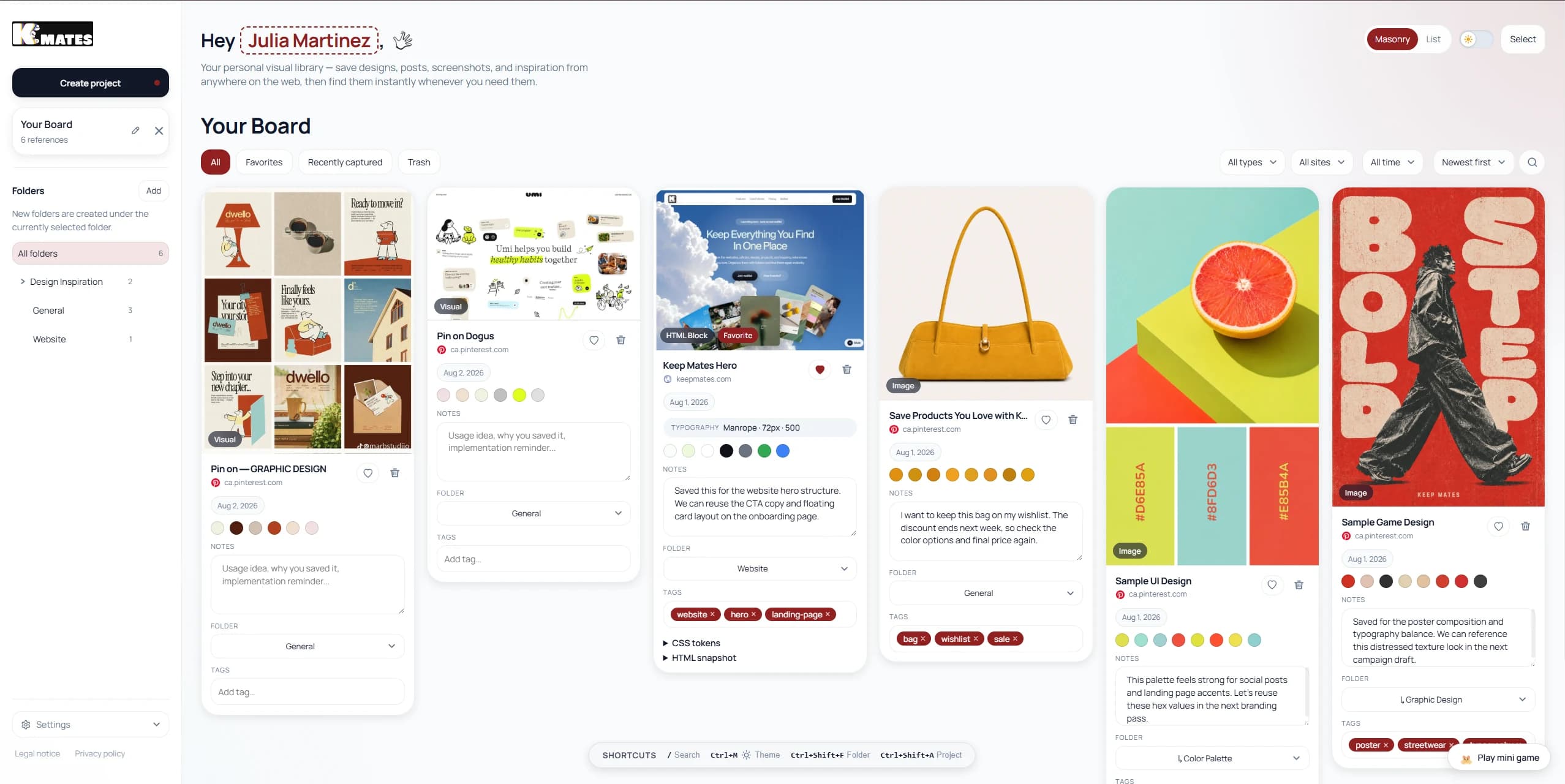
Keep Mates is a Chrome extension that turns saving into something closer to a photo album than a link list:
- One-click element capture - screenshot any specific part of a page (a button, a card, a whole section), not just the full page.
- Automatic color extraction - the palette gets pulled the moment you save, no eyedropping hex codes later.
- Font and CSS access - see the typography and styling behind anything you save, right at the point you save it.
- Folders and notes, your way - organize by project, by client, by mood board, however your work actually breaks down.
- Everything stays local - your reference library lives on your machine, not on a server somewhere you don't control.
We think of it as "your library for the internet" - a place to keep design inspiration, articles, and products you don't want to lose track of, without losing the visual context that made them worth saving.
How It Fits Into a Real Workday
Say you're deep in a client project and land on a page with a color scheme worth remembering. Instead of bookmarking the whole page and hoping you'll recall why later, you select just that section, capture it, and Keep Mates pulls the palette automatically into the folder for that project. No separate eyedropper tool, no switching tabs, no "I'll write the hex codes down later" that never actually happens.
Multiply that by everything you collect in a week - competitor screenshots, font pairings, layout ideas - and the difference shows up fast. Instead of a bookmarks bar full of titles you have to squint at, you open a folder and see exactly what you saved, the way you actually think about your own work.
Who Keep Mates Is For
We built Keep Mates around our own workflow at a digital agency, but it's turned out to be useful for anyone doing visual work: designers building a swipe file before a new project, marketers tracking competitor pages and creative over time, developers collecting UI patterns for their next build, or anyone tired of a bookmarks bar full of dead links they'll never click again.
Pricing and Privacy
Keep Mates is free to start - 35 saves and 5 folders, no credit card required. The Pro plan expands your capacity and lets you use the extension across two devices, for $9/month.
On privacy: everything you capture stays local on your own machine rather than being uploaded to a server. Your reference library stays yours, by design - not as an afterthought.
If any of this sounds like your own bookmarks bar, it's probably worth five minutes to try.
Related Reading
Continue with the most relevant follow-up guides.
If you are still comparing tools after this article, the best next step is to keep the linking contextual instead of jumping into a generic card grid. These follow-up articles extend the exact decision you are making here.
If this article made you compare adjacent options, read Best Visual Bookmark Manager for Designers in 2026. A deep, designer-focused comparison of the best visual bookmark managers in 2026 — Keep Mates, Eagle, Raindrop.io, Milanote, MyMind, and more.
If this article made you compare adjacent options, read Visual Bookmark Manager Guide for Designers and Developers. End tab clutter. Discover privacy-first, local-first, visual bookmarking methods for your creative and technical projects.
If this article made you compare adjacent options, read Why Your Browsing History Should Not Go to a Server. Learn why local-first save tools protect privacy better than cloud-first apps, and why your browsing history should stay on your own device.
For broader research, browse the full blog archive for more comparisons, bookmarking guides, and read-it-later alternatives.
Ready to organize what you save?
Use the same research habit inside a cleaner archive.
Keep Mates helps you save pages, images, posts, colors, and fonts into folders so the references you collect stay usable after the tab is gone.
