
Designers and developers do not save the web in the same way casual users do. A typical workday might involve landing pages, UI patterns, GitHub repositories, API documentation, font pairings, CSS tricks, product benchmarks, and social posts with one useful idea buried inside them. The problem is not collecting references. The problem is finding them again after the moment has passed.
Overview
Designers and developers do not save the web in the same way casual users do. A typical workday might involve landing pages, UI patterns, GitHub repositories, API documentation, font pairings, CSS tricks, product benchmarks, and social posts with one useful idea buried inside them. The problem is not collecting references. The problem is finding them again after the moment has passed.
Traditional browser bookmarks were built for a web of page titles and URLs. Modern creative and technical work is much more visual, much more mixed, and much more project-driven. When your library depends on text-only bookmark lists or dozens of permanently open tabs, retrieval becomes slower, mental overhead grows, and important references quietly disappear into noise.
This guide explains why visual bookmarking works better for modern workflows, why local-first storage matters for privacy and speed, and how to build a system that stays usable as your archive grows.
Why Traditional Bookmarks Break Down in Modern Workflows
Most default bookmark systems still assume that a short page title is enough to help you recognize something later. That assumption fails quickly in design and development work.
A designer rarely remembers a saved page by its exact title tag. They remember a bento grid, a brutalist type treatment, a clever onboarding flow, or a color system. A developer often remembers a code example, a docs layout, a component pattern, or the way a product structured its integration page. In both cases, visual memory and contextual memory are doing more work than text memory.
The second problem is tab hoarding. People keep fifty or a hundred tabs open because closing them feels like losing work. Those tabs consume RAM, but more importantly they create visual pressure. The browser becomes a temporary memory system, which is a fragile way to manage research.
The third problem is cloud dependence without enough control. Many bookmarking tools store your library, notes, tags, and browsing patterns on remote servers. That may be acceptable for casual reading lists, but it becomes more sensitive when your saved material includes client research, unpublished product ideas, internal docs, or long-term technical investigation.
What Visual Bookmarking Changes
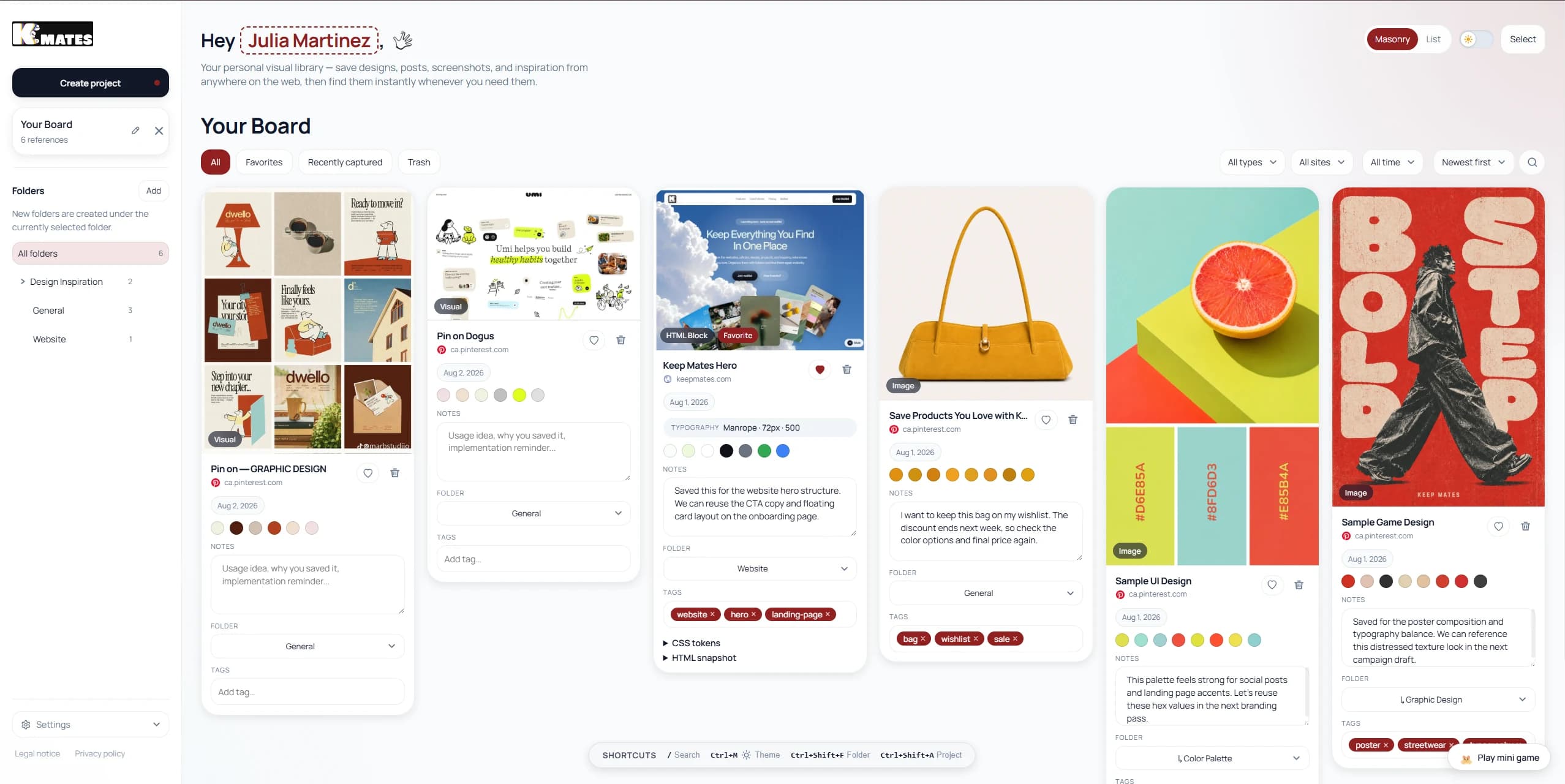
Visual bookmarking replaces the "read a title and guess" pattern with a faster recognition workflow. Instead of scanning a long list of blue links, you browse cards, screenshots, thumbnails, and richer saved context.
That changes retrieval in a meaningful way. Recognition is usually faster than recall. When you can see the saved page, image, or post again, you do not need to reconstruct it from vague memory.
For designers, this means layouts, typography, interaction patterns, and image direction stay recognizable. For developers, it means documentation styles, component structures, product patterns, and code-adjacent references are easier to relocate.
The best visual bookmark systems also preserve more than the picture. They keep the source URL, the page context, and the project grouping around the save. That matters because a screenshot without a source often becomes dead inspiration, while a live visual reference remains reusable.
Comparing Common Approaches
| Workflow trait | Browser bookmarks | Cloud bookmark tools | Local-first visual bookmarking |
|---|---|---|---|
| Recognition speed | Low | Medium | High |
| Visual previews | Minimal | Usually available | Core workflow |
| Offline access | Partial | Often limited | Strong |
| Privacy control | Browser-dependent | Third-party storage | Device-first |
| Fit for mixed references | Weak | Medium | Strong |
The point is not that every cloud tool is bad or every browser bookmark is useless. The point is that the storage model should match the kind of references you actually collect. If your archive mixes inspiration, research, screenshots, pages, posts, and technical resources, text-first tools start creating friction very quickly.
Why Local-First Architecture Matters
Local-first storage is not only a privacy preference. It is also a workflow advantage.
When saved references live primarily on your device, filtering and searching can feel instantaneous. You do not wait on network round trips just to browse something you already captured. That becomes especially important when your archive grows beyond a few dozen items and starts functioning as an actual working library.
Privacy is the second benefit. Designers and developers often save material that reveals current priorities before they are public. A collection of saved pages can expose product direction, competitor research, hiring plans, redesign goals, architecture questions, and personal interests. Keeping that archive device-first reduces unnecessary exposure.
Resilience is the third benefit. A local-first archive is less fragile when a service changes pricing, limits exports, degrades its free plan, or disappears entirely. If you care about long-term access to your references, reducing dependence on someone else's server is a practical decision, not just an ideological one.
Build a Taxonomy You Can Maintain
The biggest mistake in bookmarking is assuming that saving is enough. Saving without a usable structure only delays the mess.
A practical system usually combines a broad folder layer with a lighter tag layer.
- Use folders for durable top-level contexts such as `UI Inspiration`, `Frontend Patterns`, `Developer Docs`, `Active Client Research`, or `Side Project References`.
- Use subfolders only where the distinction will remain stable over time, such as `Landing Pages`, `Onboarding`, `Forms`, `Pricing`, or `Animation`.
- Use tags for attributes that cross categories, such as `Minimal`, `Dark`, `React`, `Tailwind`, `Fintech`, `B2B`, `Docs`, or `To Review`.
- Avoid over-designing the taxonomy on day one. A system that is slightly broad but consistently used is better than a perfect structure that nobody maintains.
Folders answer "where does this belong right now?" Tags answer "how might I want to find this later?" You usually need both.
A Practical Visual Bookmarking Routine
Sustainable systems depend less on theory and more on capture habits. A simple routine is usually enough.
- Capture in one click whenever possible. If saving interrupts your browsing flow, you will stop doing it consistently.
- Save the visual with the source. A page preview, screenshot, or image card should still link back to the live reference.
- Add one fast piece of context while saving: a folder, a tag, or a short note about why it matters.
- Keep active project boards separate from evergreen inspiration. This prevents temporary research from polluting your long-term library.
- Review monthly. Delete dead links, merge overlapping tags, and move the best temporary references into your permanent archive.
This kind of routine keeps the system lean without turning organization into a job of its own.
What Designers and Developers Should Look For in a Tool
Not every visual bookmarking product supports the same kind of work. Before choosing one, check whether it handles the following well:
- Mixed content types such as pages, images, posts, products, and documents
- Visual previews that remain useful after weeks or months
- Source preservation so the saved item does not become an orphaned screenshot
- Fast search and filtering across folders, tags, or projects
- Enough privacy control for research that should stay personal or client-confidential
- A storage model that will still feel trustworthy in two years, not just today
If the tool is attractive but weak on retrieval, it will eventually become another holding zone instead of a usable library.
A Cleaner Archive Improves Real Work
Better bookmarking is not about collecting more. It is about reducing the time between remembering that something exists and putting it back into use.
For designers, that means less time digging through screenshots and more time comparing real references. For developers, it means fewer lost docs, fewer forgotten implementation examples, and less dependence on open tabs as a memory crutch. For both, it means a calmer workspace and a reference system that supports active work instead of slowing it down.
If your current setup is a mix of tab clutter, vague bookmark folders, and scattered screenshots, moving to a visual, privacy-aware, local-first system is one of the simplest workflow upgrades you can make.
FAQ
What is a visual bookmark manager?
Short Answer
A visual bookmark manager stores saved pages, images, posts, or references as previews you can recognize quickly instead of plain text links alone.
Why is visual bookmarking useful for designers and developers?
Short Answer
Because both groups often remember references by layout, image, interaction, component pattern, or page context rather than by title alone.
What does local-first mean in bookmarking?
Short Answer
It means your saved library primarily lives on your device, which can improve speed, privacy, offline access, and long-term control.
Are browser bookmarks enough for creative and technical work?
Short Answer
They are often enough for simple link saving, but they become hard to scan and hard to maintain when your archive is visual, mixed, and project-driven.
How often should I review a bookmark library?
Short Answer
A short monthly review is usually enough to remove stale saves, fix structure drift, and keep the archive useful.
Related Reading
Continue with the most relevant follow-up guides.
If you are still comparing tools after this article, the best next step is to keep the linking contextual instead of jumping into a generic card grid. These follow-up articles extend the exact decision you are making here.
If this article made you compare adjacent options, read Best Visual Bookmark Manager for Designers in 2026. A deep, designer-focused comparison of the best visual bookmark managers in 2026 — Keep Mates, Eagle, Raindrop.io, Milanote, MyMind, and more.
If this article made you compare adjacent options, read Why Your Browsing History Should Not Go to a Server. Learn why local-first save tools protect privacy better than cloud-first apps, and why your browsing history should stay on your own device.
If this article made you compare adjacent options, read Why We Built Keep Mates: A Visual Bookmarking Tool for People Who Actually Collect Things. Keep Mates started as a fix for a messy bookmarks bar. Here's the story behind the visual bookmark manager - and what it actually does.
For broader research, browse the full blog archive for more comparisons, bookmarking guides, and read-it-later alternatives.
Ready to organize what you save?
Use the same research habit inside a cleaner archive.
Keep Mates helps you save pages, images, posts, colors, and fonts into folders so the references you collect stay usable after the tab is gone.
