
 Add to Chrome
Find
Favorites
Use favorites for the references you return to repeatedly.
Favorites are for the small set of saves you expect to revisit often. They should stay selective enough to feel useful, not turn into another full archive layer.
Mark a saved reference as favorite
Use favorites for the references you want to surface faster without moving them out of their existing folder or board.
A favorite is best for something you expect to open repeatedly, such as a strong example, a reusable palette, a high-value reference page, or a save you want to keep close while a project is active.
- 1
Open the saved reference card you want to keep close.
- 2
Click the heart icon on the card to mark that item as a favorite.
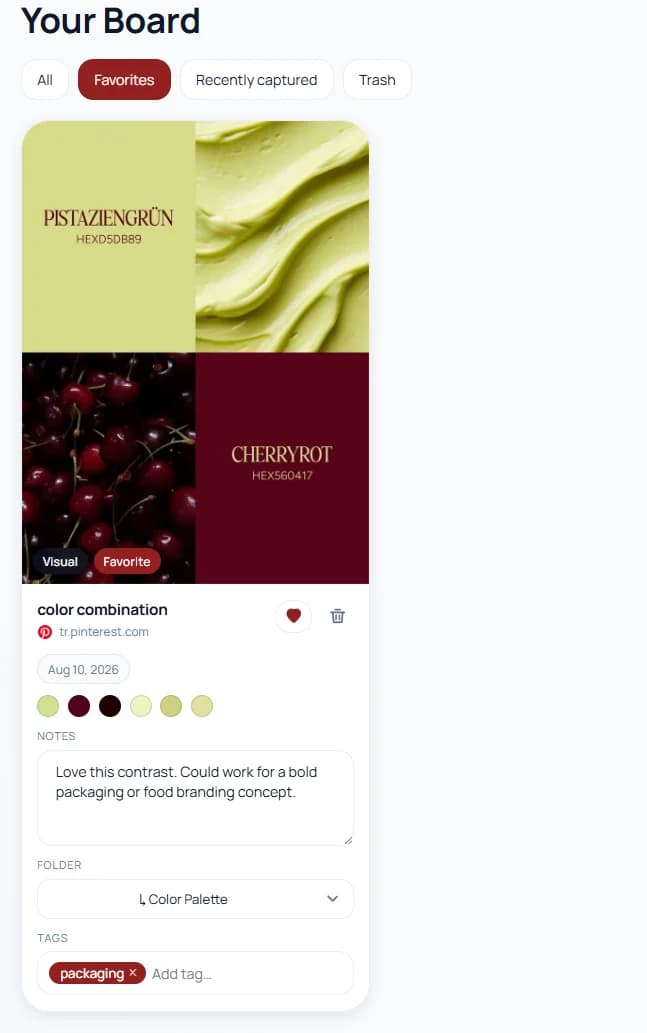
Favoriting keeps important references easy to surface without changing the rest of your archive structure. - 3
Use the Favorites view at the top of the board to see only favorited items.
Pro tip: Use favorites for active references you return to often, not for everything you simply like.
Keep the Favorites view high-signal
A short favorite list is much more useful than a bloated one. If too many items become favorites, the Favorites view starts turning into another full board.
Review favorites occasionally and remove items that no longer deserve immediate access once the project, task, or inspiration need has passed.
- Favorite current project references
- Favorite reusable examples you open repeatedly
- Unfavorite items when they stop being high-priority