
 Add to Chrome
Save
Video
Save video references in a way that keeps them understandable after the moment is gone.
Video saves are most useful when they stay connected to the reason you saved them. Without context, video links quickly become hard to remember or prioritize.
What to save as video
Use video saves for product demos, tutorials, inspiration clips, interviews, and references you expect to revisit later.
If the video itself is the unit you care about, save it as a clear standalone reference.
- 1
Open the video page you want to keep.
- 2
Right-click on the page and open the Keep Mates menu.
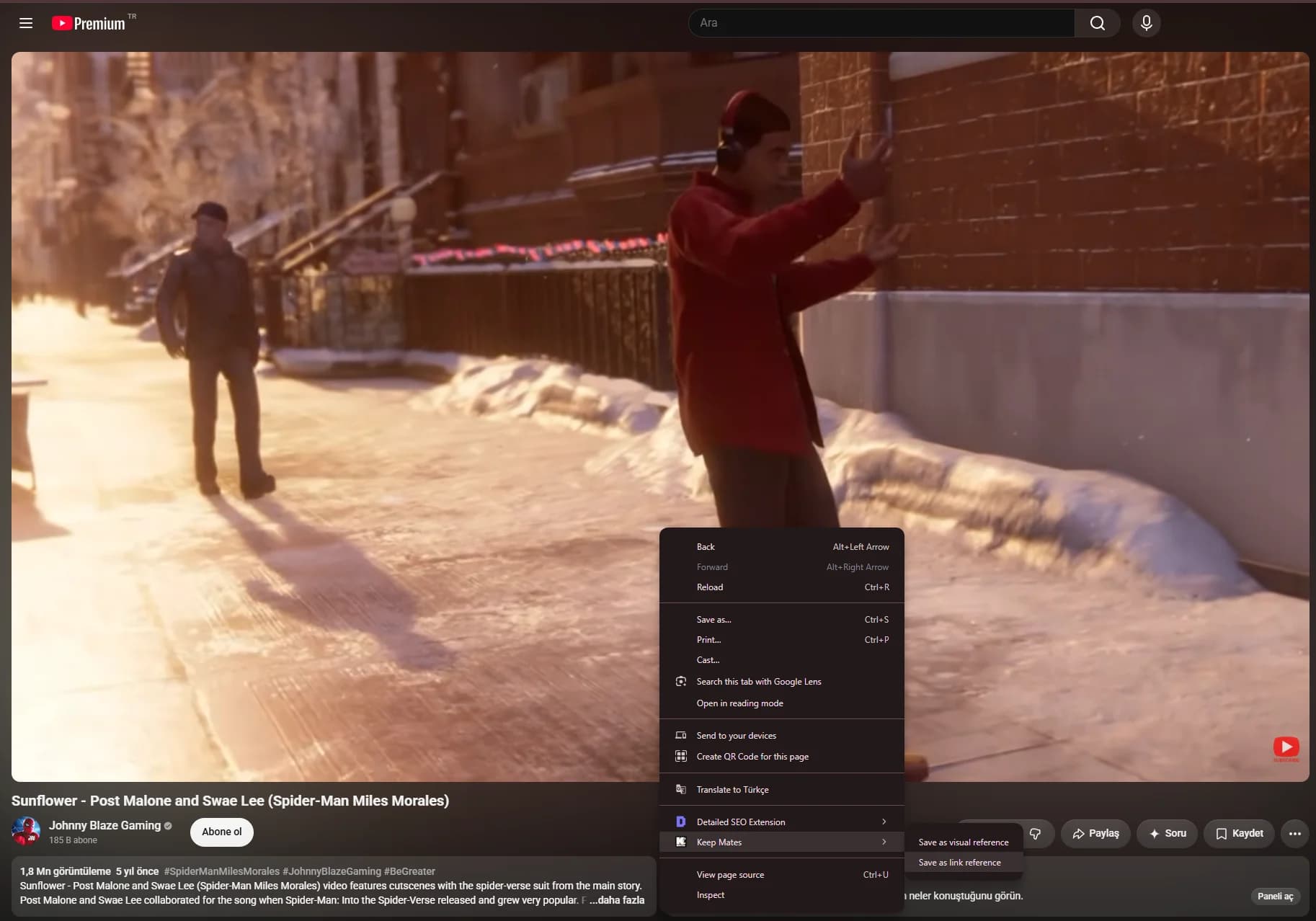
Video references are easier to find later when you save the page while the source, title, and context are still obvious. - 3
Choose Save as link reference or Save as visual reference based on what you need from the video.
Pro tip: Use a short note for the reason you saved the video, such as a timestamp, tutorial topic, or idea you want to reuse later.
Preserve meaning with structure
A short note or a better collection name can make the difference between a useful reference and a forgotten link.
Video libraries stay usable when you organize by what the video helps you decide or learn.