
 Add to Chrome
Save
Links
Use links for pages you want to revisit as complete references.
Links are the cleanest save type when the page itself is what matters. Product pages, documentation, landing pages, and comparison pages all fit naturally here.
What makes a good link save
A good link save is one you expect to revisit as a whole page rather than just one isolated detail.
Examples include pricing pages, research sources, roundups, and product detail pages.
Save your first link reference from a product page
A good first test is to save a real product or page you may want to revisit later. This works especially well for shopping, research, references, or pages where the full destination matters more than one isolated image.
On pages like this, Save as link reference is the better option because you are saving the page itself, not just the visible product photo.
- 1
Open the product page, article, or useful page you want to keep.
- 2
Right-click the image or page area and open the Keep Mates submenu in the browser context menu.
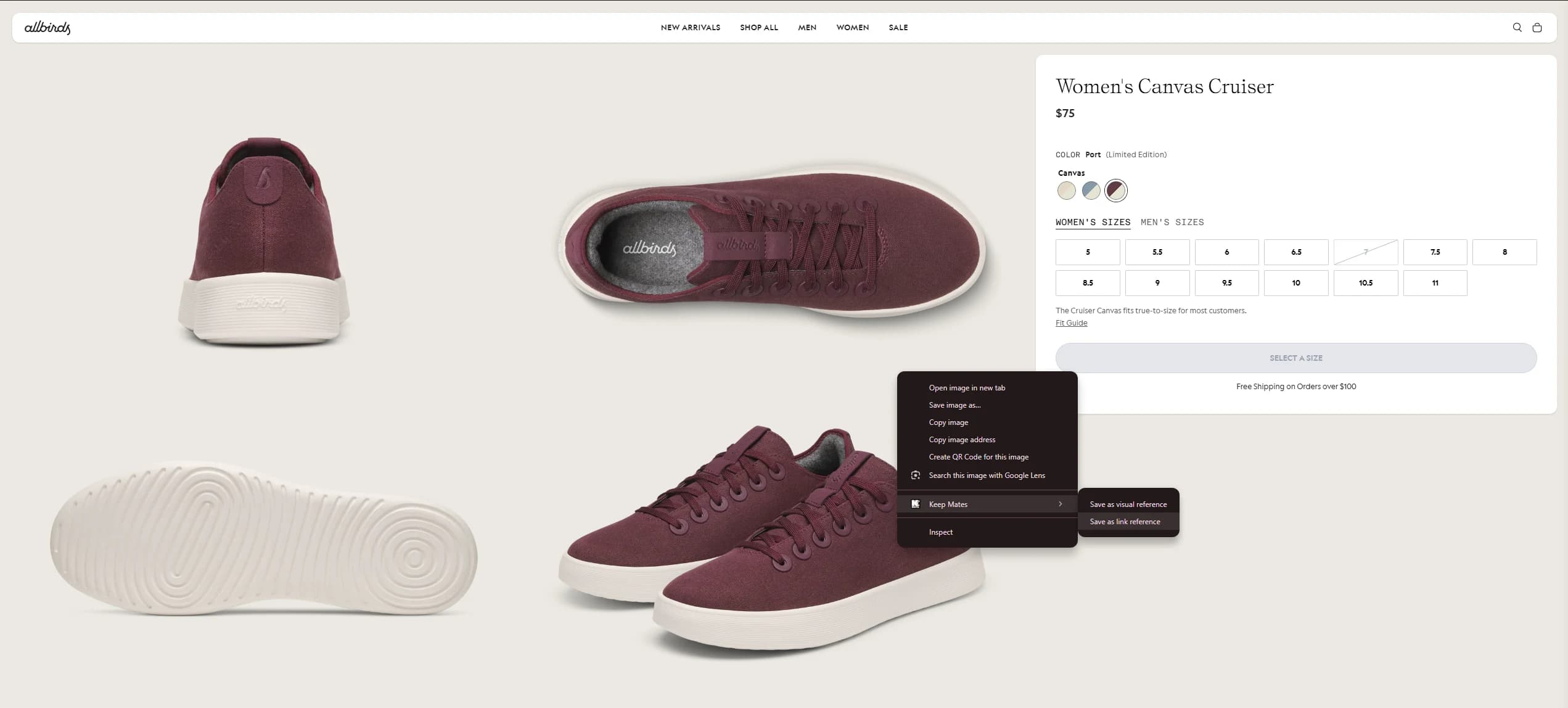
Use Save as link reference when the full product page or destination is what you want to reopen later. - 3
Choose Save as link reference to save the full page as a reusable reference.
Pro tip: Use Save as visual reference instead when the image itself matters more than the page behind it.
Do not let links become a pile
Link libraries stop working when everything lands in one generic bucket.
Use a small amount of organization so saved pages stay easy to scan later.